
If you’re deeply involved in Raspberry Pi camera projects, RTMP streaming, or DIY security servers, you know the scenario all too well. Frame rates plummet, streams inexplicably freeze, or your camera application crashes with an
If you’re deeply involved in Raspberry Pi camera projects, RTMP streaming, or DIY security servers, you know the scenario all too well. Frame rates plummet, streams inexplicably freeze, or your camera application crashes with an inscrutable error. You dutifully check htop, and everything seems fine – CPU at 40%, plenty of free RAM. So, what’s the actual culprit?
The truth often lies hidden within the Raspberry Pi’s unique hardware architecture, specifically within the critical domains of CMA (Contiguous Memory Allocation) and DMA Buffers. Standard Linux monitoring tools remain stubbornly blind to these vital metrics. That was the precise motivation behind my original creation, stream_top.
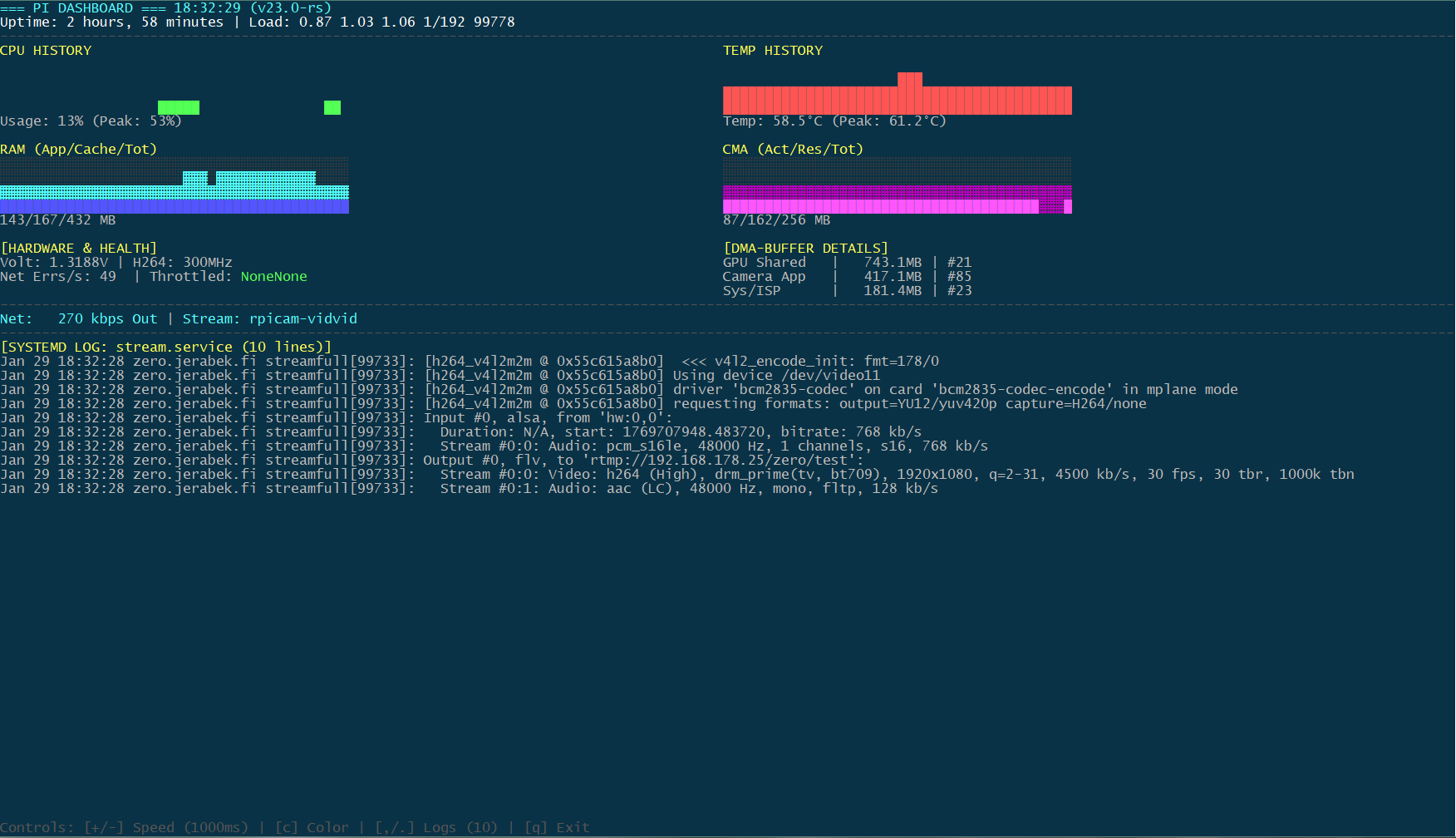
But the journey doesn’t end there. Today, I’m thrilled to introduce its powerful successor: stream_dash (v23.0-rs). It does everything stream_top did, but it’s faster, more beautiful, and offers an unprecedented level of visual insight – all while demanding even less CPU.
`
From Numbers to Narratives: Why stream_dash is the Game Changer
stream_top was a crucial first step, pulling vital hidden data to the surface. stream_dash takes this a massive leap forward by transforming raw numbers into real-time history graphs and dynamic visualizations. It’s no longer just about what is happening, but how it’s evolving over time.
`
Why Standard Monitoring Still Fails (and How stream_dash Excels)
Modern Pi camera stacks (powered by libcamera) and hardware encoders (like h264_v4l2m2m) demand specialized, physically contiguous memory (CMA). If this pool runs dry, the GPU halts, refusing new frames – even if your system shows gigabytes of “free” RAM. stream_dash not only exposes this invisible pressure but also visualisiert dessen Verlauf.
Key Highlights of stream_dash (The Evolution):
- Real-Time History Graphs (New!): No more single-point snapshots.
stream_dashprovides 42-point sparkline graphs for CPU usage and temperature, allowing you to instantly spot trends, overheating, or sudden load spikes. - Triple-Stacked Memory Graphs (New!): This is where
stream_dashtruly shines. For both RAM and CMA, we use a unique layered visualization to show memory health at a glance:- █ Active (Bright): Data actively in use (application code, live video frames).
- ▓ Reserved/Cached (Dim): System-managed buffers (Linux Cache or CMA pre-allocations).
- ░ Total Capacity (Dark): Your hardware ceiling. This offers an intuitive “fill gauge” for your most critical memory pools.
- DMA-Buffer Deep Dive: Identify exactly which component is consuming your precious memory. Is it the Camera App? GPU Shared memory? The Kernel bridge?
stream_dashbreaks it down with clear labels and memory consumption. - Network Health (Delta Mode): Beyond total errors, the tool tracks transmit errors per second – the crucial “smoking gun” for unstable WiFi during live streams.
- Deep Hardware Sensors: Keep a vigilant eye on VPU voltage, H.264 clock speeds, and real-time thermal throttling status (indicating heat or power issues).
- Integrated Service Logs: Monitor your
stream.service(systemd) output directly within the dashboard. Scrollable and adjustable in depth, it eliminates the need for multiple SSH windows. - Dynamic Color Themes (New!): Because functionality doesn’t have to be boring. Toggle between Modern (Default), Cyberpunk (Vibrant), and Classic (Green/Amber) themes with a single keypress. `
Field Test: Pi Zero 2 W vs. Pi 4B – Now with Visual History
During development, it became starkly clear how differently these boards manage video workloads. While the Pi 4B boasts ample resources but can falter due to misconfigured CMA sizes, the Pi Zero 2 W fiercely battles for every byte of its 512MB RAM.
With stream_dash, you can instantly see the struggle – or the breathing room. The memory graphs immediately show if your Zero 2 still has “room to breathe” or if DMA buffers are consuming the entire system memory over time. This continuous feedback is invaluable for fine-tuning parameters like --buffer-count or your bitrate for rock-solid 24/7 stability.
Pro-Tip: Don’t panic over seemingly full CMA bars!
A critical note on CMA usage, now made clearer with our graphs: When utilizing rpicam-apps, you will likely observe the CMA memory appearing almost entirely consumed. It’s essential to understand that simply increasing cma-size in /boot/config.txt to see “more free space” is usually counterproductive. Camera applications are designed to aggressively and generously pre-allocate this memory. This isn’t a bug; it’s a stability feature. This “buffer padding” ensures your stream remains rock-solid even during high-load scenarios or framerate fluctuations, preventing dropped frames due to memory starvation. In this specific case, a full memory bar often indicates a safely configured and exceptionally stable system.
Installation: The Rust Advantage – Ready in Minutes
stream_dash is written in Rust, offering unparalleled performance, minimal CPU footprint, and robust stability – a perfect match for embedded systems like the Raspberry Pi.
1. Requirements: Ensure you have the Rust toolchain installed:
Bash
curl --proto '=https' --tlsv1.2 -sSf https://sh.rustup.rs | sh
2. Build & Run:
Bash
git clone https://github.com/axeljerabek/stream_dash.git
cd stream_dash
cargo build --release
sudo ./target/release/stream_dash
Note: sudo is required to read the kernel’s DMA debug interface.
Conclusion & Open Source
stream_dash is the evolution of a tool built by a Pi user, for Pi users. It’s the dashboard I always envisioned to keep my own streaming servers not just stable, but fully transparent. It’s completely open-source, and I eagerly await your feedback, issues, or pull requests on GitHub!
🔗 Project Link on GitHub: https://github.com/axeljerabek/stream_dash
Happy streaming – and keep a constant eye on those buffers (and beautiful graphs)!