
Deutsche Version: hier If you use a Raspberry Pi for camera projects, RTMP streaming, or DIY security servers, you know the frustration. Suddenly, the frame rate drops, the stream freezes, or the camera app crashes
Deutsche Version: hier
If you use a Raspberry Pi for camera projects, RTMP streaming, or DIY security servers, you know the frustration. Suddenly, the frame rate drops, the stream freezes, or the camera app crashes with a cryptic error. You check htop, but everything looks fine—CPU usage is at 40%, and there’s plenty of free RAM. So, what’s going wrong?
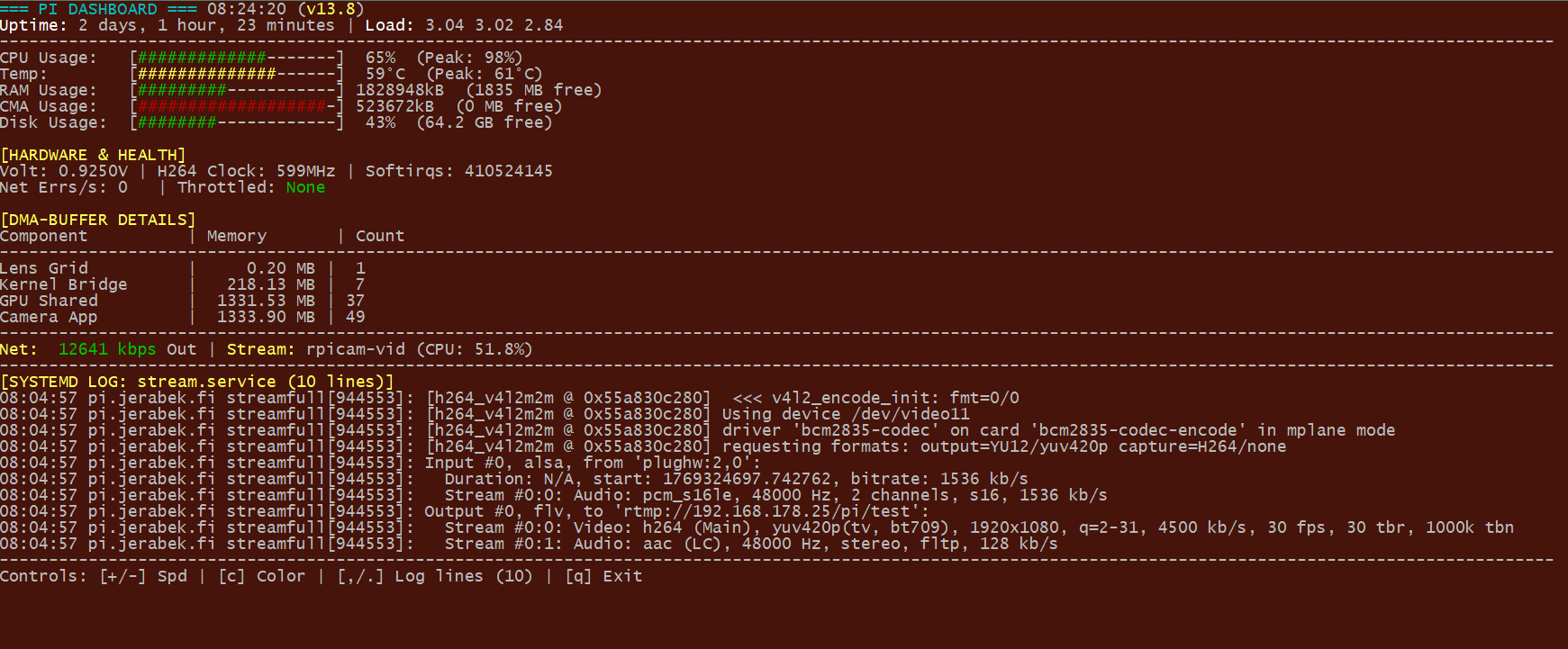
The answer lies deep within the Raspberry Pi’s hardware architecture, specifically in CMA (Contiguous Memory Allocation) and DMA Buffers. Standard Linux monitoring tools completely ignore these metrics. That is exactly why I built stream_top.
Why Standard Monitoring Fails Video Applications
Modern Pi camera stacks (based on libcamera) and hardware encoders (like h264_v4l2m2m) require a specialized area of RAM that must be physically contiguous (CMA). If this area is exhausted, the GPU cannot process new frames—even if you have 4GB of system RAM left.
stream_top makes this “invisible” hardware pressure visible.
Key Highlights of stream_top:
- Real-Time CMA Analysis: Instantly see how much of your reserved video memory is remaining.
- DMA-Buffer Deep Dive: Identify which component is hogging memory. Is it the Camera App? GPU Shared memory? The Kernel bridge? stream_top breaks it down.
- Network Health (Delta Mode): Instead of showing total errors since boot, the tool tracks transmit errors per second. This is the “smoking gun” for unstable WiFi during a live stream.
- Hardware Sensors: Keep an eye on VPU voltage, H.264 clock speeds, and thermal throttling status (heat or power issues).
- Integrated Service Logs: Monitor your
stream.service(systemd) output directly within the dashboard—no more switching between multiple SSH windows.
Field Test: Pi Zero 2 W vs. Pi 4B
During development, it became clear how differently these boards handle video. While the Pi 4B usually has massive resources but fails due to misconfigured CMA sizes, the Pi Zero 2 W fights for every byte of its 512MB RAM.
In my dashboard, you can see immediately if your Zero 2 still has “room to breathe” or if DMA buffers are consuming the entire system memory. This is the exact information you need to fine-tune parameters like --buffer-count or your bitrate for 24/7 stability.
Pro-Tip: Don’t panic over full CMA bars!
A Critical Note on CMA Usage: When using rpicam-apps, you will likely notice that the CMA memory appears almost entirely consumed. It is important to understand that constantly increasing the cma-size in /boot/config.txt just to see “more free space” is usually unnecessary. The camera applications are designed to pre-allocate this memory aggressively and generously. This isn’t a bug—it’s a stability feature. This “buffer padding” guarantees that your stream remains rock-solid even during high-load scenarios or framerate fluctuations, preventing dropped frames due to memory starvation. In this specific case, a full memory bar actually indicates a safely configured and stable system.
Installation: Ready in 60 Seconds
I’ve included a professional installer that automatically checks for all dependencies (gawk, vcgencmd, etc.) and sets up the tool system-wide.
Bash
git clone https://github.com/axeljerabek/stream_top.git
cd stream_top
sudo ./install.sh
Once installed, you can launch the dashboard from any directory simply by typing sudo stream_top.
Conclusion & Open Source
stream_top was built by a Pi user, for Pi users. It’s the tool I always wanted to keep my own streaming servers stable. It is completely open-source, and I look forward to your feedback, issues, or pull requests on GitHub!
🔗 Project Link on GitHub:
https://github.com/axeljerabek/stream_top
Happy streaming—and keep an eye on those buffers!
One thought on “Pushing Raspberry Pi Streaming to the Limit: No More “Flying Blind” with stream_top”